What Should a Business Website Have?
Imagine a potential customer discovering your business online.
They visit your website because they want to understand what you offer, see whether you are trustworthy, and find out how to work with you.
But when they arrive, they cannot find your services. Your contact information is missing, the website looks confusing on their phone, and there is no clear next step.
What happens next?
They may leave and look for another business.
This is why building a business website involves more than choosing colours, adding a logo, and publishing a few pages. Your website needs the right information and features to help visitors understand your business and take action.
So, what should a business website actually have?
Whether you run a small business, professional service, creative brand, consultancy, or growing company, this guide will help you understand what to include.
1. A Clear Homepage
Your homepage is often the first page people visit, so it should quickly explain what your business does and how it helps customers.
Visitors should not have to scroll through several sections or read a long introduction before understanding what you offer.
A good homepage answers three important questions:
- What does your business do?
- Who do you serve?
- What should visitors do next?
For example, a website development business could introduce itself with a clear statement about building websites for businesses that want to strengthen their online presence.
That communicates more than a vague headline such as "Welcome to Our World of Innovation."
Your homepage should also guide visitors towards important sections of the website.
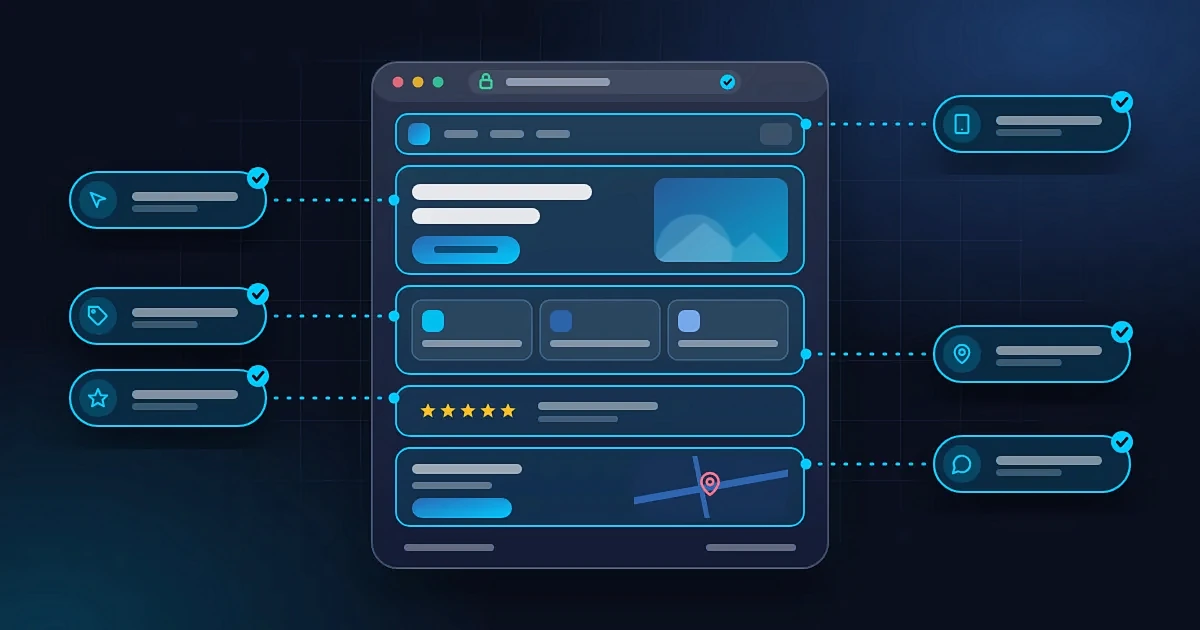
Essential homepage elements include:
- Your business name and logo.
- A clear headline explaining your value.
- A short introduction to your business.
- An overview of your main services or products.
- A clear call to action.
- Relevant images or examples of your work.
- Trust-building information.
- Links to important pages.
- A footer containing useful business information.
You do not need to squeeze every detail onto the homepage. Give visitors enough information to understand your business and find what they need.
2. An About Page
People often want to know who is behind a business before deciding to work with it.
An About page helps answer that question.
It gives visitors an opportunity to understand your business, your experience, your values, and what makes your approach different.
You do not need to write your entire life story. Focus on information that helps potential customers understand why your business exists and why they might choose to work with you.
Depending on your business, your About page could include:
- Your business story.
- Your mission or purpose.
- Your experience and relevant expertise.
- The people behind the business.
- Your approach to serving customers.
- Important qualifications or achievements.
- A link to contact you or explore your services.
For a small business, this page can be relatively short.
The goal is to make your business easier to understand and give visitors useful reasons to trust you.
3. A Services or Products Page
Visitors should be able to find out exactly what you offer.
If your business provides services, create a page explaining those services. If you sell products, provide a clear way for visitors to explore what is available.
Avoid listing service names without explaining what they mean.
For each important service, explain:
- What the service involves.
- Who it is suitable for.
- What problem it helps solve.
- What customers can expect.
- How to enquire or get started.
For example, a photography business might offer wedding photography, portraits, and event coverage. Each service could have its own section explaining what is included and how customers can make a booking.
A business with several distinct services may benefit from separate pages for each one. This makes information easier to navigate and gives each service a clearer focus.
A product-based business may need product descriptions, images, prices, stock information, and purchasing options instead.
The important thing is clarity. Potential customers should understand what you offer before they contact you.
If you are still planning your website, explore Emmy STACK01 website services to see how a business website can be structured around your needs.
4. Clear Contact Information
Your website should make it easy for people to reach you.
This sounds obvious, but some business websites make visitors work unnecessarily hard to find a phone number, email address, or contact form.
Depending on how your business operates, useful contact options might include:
- A business email address.
- A phone number.
- A WhatsApp contact link.
- A contact form.
- Your business address, if customers visit your location.
- Business hours, where relevant.
- Links to your professional social media profiles.
You do not need to display every possible contact method. Choose the options your customers are most likely to use and make them easy to find.
If you serve customers in Nigeria, for example, a WhatsApp link may be useful for enquiries. However, it should not replace other contact options if your audience expects them.
Place important contact information somewhere visitors can find it easily, such as your Contact page and website footer.
Also, test every contact link and form before publishing your website.
A contact form that does not work can cost you genuine enquiries.
5. A Clear Call to Action
A call to action, or CTA, tells visitors what they can do next.
Without one, people may browse your website, find your services interesting, and leave without taking any action.
Your CTA should match the purpose of your business and the page the visitor is viewing.
Examples include:
- Request a Quote.
- Book an Appointment.
- Contact Our Team.
- Shop Now.
- View Our Portfolio.
- Schedule a Consultation.
- Get Started.
For a service business, a button that leads to an enquiry form may be more useful than a generic "Learn More" button.
For an online store, the main action might be adding a product to the cart.
For a consultant, it might be booking an introductory call.
Place calls to action where they make sense. Your homepage, services pages, and relevant content pages are common places to include them.
You should also make sure every button works and leads to the intended destination.
Your website should guide visitors towards useful next steps without pressuring them at every turn.
6. A Mobile-Friendly Layout
Many potential customers will visit your website on a smartphone.
Your website should therefore be designed to work across different screen sizes, not just desktop computers.
A mobile-friendly website makes it easy for people to read content, navigate pages, view images, and use interactive features on smaller screens.
Check that:
- Text is readable without zooming in.
- Buttons are easy to tap.
- Navigation menus work correctly.
- Images fit the screen.
- Forms are easy to complete.
- Important information is not hidden or cut off.
- Visitors do not need to scroll horizontally to read content.
Do not assume your website works on mobile simply because it opens on your phone.
Test the actual experience, including menus, forms, buttons, and important pages.
A website that looks good on a laptop but frustrates smartphone users is not doing its job properly.
7. Trust Signals and Proof of Your Work
Before contacting a business, people often look for reasons to believe it can deliver what it promises.
Your website should provide credible information that helps them make that decision.
Useful trust signals can include:
- Genuine customer testimonials.
- Case studies.
- Portfolio examples.
- Completed projects.
- Relevant qualifications.
- Professional memberships.
- Clear business information.
- Accurate service descriptions.
- Transparent policies.
Not every business needs all these elements.
A photographer might prioritise a portfolio. A consultant might highlight relevant experience and case studies. A local service provider might focus on genuine reviews, service areas, and clear contact details.
Use evidence that is relevant to your audience.
Never invent customer reviews, exaggerate your experience, or display achievements that cannot be verified.
If your business is new and you do not have many testimonials yet, focus on presenting your work clearly, explaining your process, and making it easy for people to understand what you offer.
Trust is built through credible information, not just impressive design.
8. A Portfolio or Examples of Your Work
If customers need to assess the quality of your work before hiring you, consider including a portfolio.
This is particularly useful for:
- Designers.
- Photographers.
- Developers.
- Architects.
- Writers.
- Video editors.
- Marketing professionals.
- Creative agencies.
- Event planners.
Your portfolio should show relevant work and, where possible, explain the problem, your contribution, and the outcome.
For example, a web designer could show screenshots of a completed website and briefly explain the client's goals and the design decisions made to support them.
If you have permission to share client projects, include links to the finished work where appropriate.
If you are just starting, you can showcase clearly labelled sample projects or personal projects rather than pretending they were paid client engagements.
A portfolio gives potential customers something concrete to evaluate instead of asking them to rely entirely on your claims.
If your business does not depend on visual examples, you may not need a dedicated portfolio page. Choose the format that best demonstrates your capabilities.
9. Useful and Well-Written Content
Your website content should help visitors understand your business and make informed decisions.
That includes more than the homepage and services page. You may also need descriptions, FAQs, product details, guides, or other resources depending on your business.
Good website content is:
- Clear and easy to understand.
- Relevant to your target audience.
- Accurate and up to date.
- Organised into useful sections.
- Free from avoidable spelling and grammar errors.
- Specific about what your business offers.
Avoid filling pages with vague marketing statements that sound impressive but provide little useful information.
Instead of saying your company provides "world-class, innovative solutions," explain what you actually do and how it helps customers.
You should also answer common questions before people have to contact you.
If customers frequently ask about delivery, payment methods, project timelines, booking procedures, or service areas, consider providing those answers on your website.
Useful content can improve the visitor experience and help search engines understand the subjects your website covers.
10. Basic SEO Foundations
A business website should be built so search engines can discover and understand its content.
Search engine optimisation, or SEO, helps your website communicate what each page is about and makes it easier to compete for relevant searches.
Basic SEO elements include:
- Descriptive page titles.
- Useful meta descriptions.
- Clear page headings.
- Meaningful URLs.
- Relevant internal links.
- Helpful, original content.
- Descriptive image alternative text where appropriate.
- A mobile-friendly experience.
- Technically accessible pages.
- Appropriate indexing and sitemap configuration.
Your content should also use the language your potential customers use when searching for your services.
For example, if you provide event photography in Lagos, make sure your website clearly explains your event photography services and the locations you serve, where relevant.
Avoid stuffing pages with repeated keywords. Write for people first and use terms naturally.
You can also create useful articles that answer questions your audience regularly asks.
For more on improving visibility in AI-powered search experiences, read Generative Engine Optimization (GEO): How to Optimize Your Website for AI Search.
Remember that SEO takes time, and no website feature guarantees a particular position in search results.
11. Fast Loading Speed
Visitors should not have to wait unnecessarily for your website to load.
Slow pages can interrupt the user experience and discourage people from exploring your business.
Website performance can be affected by oversized images, unnecessary scripts, inefficient code, excessive animations, and hosting limitations.
You do not need dozens of animations or complicated visual effects to make your website look good.
Focus on features that improve the experience and remove those that add little value.
Useful performance practices include:
- Optimising images.
- Reducing unnecessary scripts.
- Avoiding excessive animations.
- Using appropriate hosting.
- Testing important pages on mobile connections.
- Checking performance with tools such as Google PageSpeed Insights.
Speed should be considered during development, not only after the website has been completed.
12. Security and HTTPS
Your website should use appropriate security measures to protect visitors and your business.
One visible foundation is HTTPS, which helps encrypt information exchanged between a visitor's browser and your website.
You can generally identify an HTTPS website by the address beginning with https://.
Depending on your website's functionality, you may also need secure form handling, software updates, access controls, backups, spam protection, and additional safeguards.
If your website accepts payments or stores customer information, security requirements become even more important.
The specific measures you need will depend on how the website operates and what information it handles.
Remember that HTTPS is a starting point, not a complete security strategy.
13. A Website Footer
The footer is the section at the bottom of your website.
It may not receive as much attention as the homepage, but it provides a useful place for important information and navigation.
A business website footer might include:
- Your business name or logo.
- Contact information.
- Links to important pages.
- Links to professional social media accounts.
- Privacy policy.
- Terms and conditions, where applicable.
- Copyright information.
Depending on your business, you might also include your business address, operating hours, or a link to your service areas.
Keep the footer organised. It should help visitors find information without becoming a crowded list of every possible link.
14. Privacy Information and Relevant Policies
If your website collects personal information, accepts payments, allows account creation, or provides services under specific terms, you may need relevant policies and disclosures.
For example, a website that collects names and email addresses through a form should explain how the information is handled in an appropriate privacy notice.
An online store may also need clear information about orders, payments, delivery, returns, and refunds.
The exact requirements depend on your activities, the information you collect, and the laws and regulations that apply to your business.
Do not copy another company's policies without checking whether they accurately describe your own practices.
If you are unsure about your legal obligations, seek advice from a qualified professional.
The goal is to give visitors clear information about how your business operates and how their information is handled.
15. Analytics and Website Monitoring
Publishing a website is not necessarily the end of the process.
Once your website is live, you may want to understand how people find it, which pages they visit, and whether they complete important actions.
Analytics and monitoring tools can help you evaluate performance and identify problems.
Depending on your needs, you might consider:
- Google Analytics or another suitable analytics platform.
- Google Search Console.
- Website uptime monitoring.
- Form submission tracking.
- Conversion tracking.
- Performance monitoring.
You do not need to install every available tool.
Choose tools based on the questions you need to answer, and configure them appropriately. If your setup uses cookies or collects personal data, consider the relevant privacy requirements.
Monitoring helps you make informed improvements rather than relying entirely on assumptions.
16. A Domain Name and Reliable Hosting
Your domain name is the address people use to visit your website.
For a business, using a suitable domain connected to its name or brand can help create a more consistent online identity.
Your hosting service stores the files and resources required to make your website available online.
When choosing a domain and hosting arrangement, consider:
- Whether the domain fits your business.
- Renewal costs.
- Hosting performance and reliability.
- Security features.
- Backup options.
- Support availability.
- Your website's storage and traffic requirements.
A more expensive hosting plan is not automatically necessary for every business.
A small business website may have very different requirements from a large online store or a platform with thousands of active users.
Choose a setup that fits your actual needs and can accommodate reasonable growth.
Also, make sure you understand who controls your domain registration and hosting accounts. Keeping ownership and access clear can prevent problems later.
17. Frequently Asked Questions
An FAQ section can answer questions visitors commonly have before they decide to contact you.
It is particularly useful when customers repeatedly ask about the same topics.
For a service business, FAQs might cover:
- What services do you offer?
- How does your process work?
- How long does a project take?
- How much do your services cost?
- Which locations do you serve?
- How can someone get started?
For an online store, FAQs might cover delivery, payment methods, returns, and product availability.
You do not need to create a long FAQ section just to make the website look complete.
Start with genuine customer questions and provide clear, accurate answers.
This helps visitors find information quickly and can reduce repetitive enquiries.
Does Every Business Website Need All These Things?
No.
The list above covers common business website requirements, but your website should be designed around your business model and the needs of your customers.
A freelance designer may need a homepage, portfolio, services information, About page, and contact options.
A local restaurant may need a menu, opening hours, location, booking details, and delivery information.
An online store may require product listings, a shopping cart, checkout, payment integration, delivery information, and relevant policies.
A professional consultancy may prioritise its expertise, services, case studies, and appointment booking.
The right website is not the one with the most pages or features. It is the one that gives visitors the information and tools they need.
Start with the essentials. Add more functionality when it solves a real problem.
How Much Does It Cost to Build a Business Website?
The cost depends on the website's size, design, functionality, content requirements, and the expertise involved in building it.
A simple business website will generally require a different budget from a custom platform or an online store with complex functionality.
You should also consider recurring expenses such as domain renewal, hosting, maintenance where needed, and any paid services your website depends on.
Before hiring a developer, make sure you understand what is included in the proposed price.
Ask about the pages, features, mobile responsiveness, SEO foundations, deployment, and ongoing costs.
Avoid choosing a provider based on price alone. A cheap website that fails to support your business needs may cost more to fix or replace later.
For more guidance, read our article on How Much Does a Website Cost in Nigeria?.
You can also review Emmy STACK01 pricing to explore the available options.
Final Thoughts
A business website should do more than exist online.
It should explain what your business does, present your services clearly, build trust, answer important questions, and help potential customers take the next step.
For many businesses, the essentials include a clear homepage, About page, services or products page, contact information, calls to action, mobile-friendly design, useful content, basic SEO, appropriate security, and reliable hosting.
Other features, such as a portfolio, FAQ section, booking system, online store, or analytics tools, depend on your specific goals.
You do not have to build everything at once.
Start by understanding what your customers need from your website, then prioritise the pages and features that will help them.
A well-planned website can give your business a stronger foundation online and make it easier for people to understand what you offer.
or view our pricing to get started.