Why Your Business Website Gets Visitors But No Customers
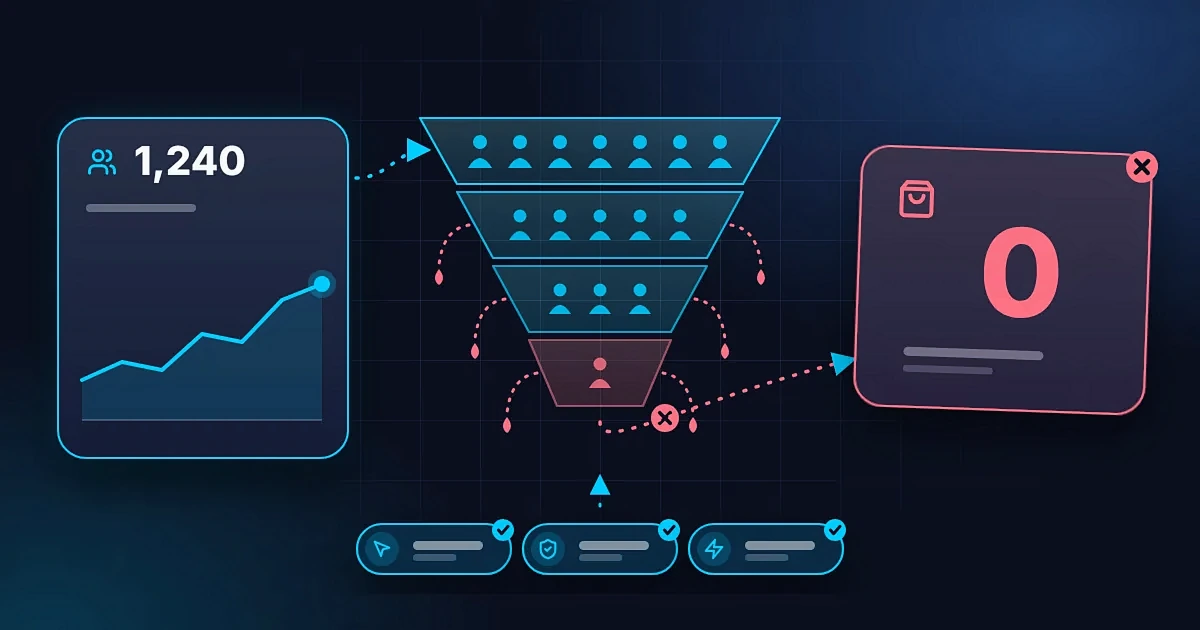
Imagine checking your website analytics and seeing that people are visiting your website.
Your traffic is growing. People are viewing your pages. Maybe some visitors even spend a few minutes exploring what you offer.
But there is one problem.
Nobody is contacting you. Nobody is requesting a quote. Nobody is booking your services or buying your products.
So, what is happening?
If your business website gets visitors but no customers, you may be dealing with a conversion problem.
Getting people to visit your website is important, but traffic alone does not guarantee business growth. Visitors still need to understand what you offer, trust your business, see the value in your products or services, and know what to do next.
The good news is that there are practical ways to investigate and improve the situation.
Let's look at the most common reasons business websites struggle to turn visitors into customers.
1. Visitors Cannot Immediately Understand What You Offer
When someone lands on your website, they should not have to guess what your business does.
If your homepage is filled with vague statements such as "Delivering innovative solutions for a better future," visitors may struggle to understand what you actually sell.
You might know what your business does, but a first-time visitor does not have that context.
Your website should quickly communicate three things:
- What you offer.
- Who you help.
- Why someone should consider choosing you.
For example, compare these two headlines.
Vague: "Building a Better Tomorrow Through Innovation."
Clear: "We Build Professional Websites for Businesses That Want More Customers Online."
The second headline gives visitors a clearer idea of what the business does and who it serves.
Your wording does not have to sound clever. It needs to make sense to the people you want to reach.
How to fix it:
Review your homepage headline and opening section.
Ask someone unfamiliar with your business to visit the page for a few seconds, then explain what they think you offer.
If they cannot tell you, simplify your message.
2. You Are Attracting the Wrong Visitors
Not every website visitor is a potential customer.
Someone might visit your website because they are researching a topic for school, looking for free resources, comparing different solutions, or simply curious about your content.
Another visitor might need exactly what you offer but have no budget to purchase it.
This is why a high visitor count does not automatically mean your website is attracting the right audience.
Imagine you sell professional website development services, but most of your visitors are looking for tutorials on how to code websites themselves.
Your traffic might look encouraging, but those visitors may not be interested in hiring a developer.
The problem may not be your website design. It may be the type of traffic you are attracting.
How to fix it:
- Identify the search terms bringing visitors to your website.
- Review which pages attract the most relevant visitors.
- Create content around the problems your ideal customers want to solve.
- Make your target audience clear in your messaging.
- Use relevant keywords rather than chasing traffic for its own sake.
- Review whether your social media posts attract potential buyers or mainly people interested in unrelated topics.
The goal is not to attract everyone.
It is to attract people who are likely to benefit from what your business offers.
3. Your Website Talks About Your Business but Not the Customer's Problem
Business owners often build websites around what they want to say about themselves.
They talk about their experience, their company, their passion, and their services.
That information can be useful, but visitors usually arrive with their own questions.
Can you solve my problem? Is this service right for me? What will I get? Is it worth the price?
If your website does not answer these questions, visitors may leave without taking action.
For example, a potential customer looking for a website developer may care less about how much the developer loves technology and more about whether the developer can create a website that presents their business professionally and makes it easier for customers to enquire.
How to fix it:
Structure your website around the customer's needs.
Explain the problems you solve, the benefits of your services, how your process works, and what customers can expect.
Instead of listing features without context, explain why they matter.
For example, responsive design is a feature. Making your website easier to use on smartphones is a benefit customers can understand.
Your expertise matters, but visitors need to see how it relates to their situation.
4. Your Website Does Not Build Enough Trust
People may be interested in your services but still hesitate to contact you.
They might wonder whether your business is legitimate, whether you can deliver what you promise, or whether working with you will be worth their money.
This is particularly important when someone is discovering your business for the first time.
Your website should help answer those concerns with credible information.
Depending on your business, useful trust signals may include:
- Genuine customer testimonials.
- Examples of completed projects.
- Case studies.
- Relevant qualifications or experience.
- Clear contact information.
- Accurate service descriptions.
- Transparent pricing information where appropriate.
- A professional and consistent brand identity.
If your business is new and you do not have testimonials yet, you can still build credibility by explaining your process, showcasing sample work honestly, and providing clear information about your services.
Do not invent reviews or make claims you cannot support.
How to fix it:
Look at your website from the perspective of someone who has never heard of your business.
What evidence would help that person feel comfortable taking the next step?
Add relevant information that answers their concerns without exaggerating your achievements.
5. Visitors Cannot See Why They Should Choose You
Imagine searching for a service and finding five businesses that appear to offer exactly the same thing.
Each website says the business is professional, reliable, affordable, and committed to quality.
How would you choose?
If your website does not explain what makes your offer relevant or different, visitors may have little reason to choose you over another provider.
Your difference does not need to be extraordinary.
It could be your specialisation, your process, your service area, your experience with a particular type of customer, or the way your service addresses a specific problem.
For example, a website agency might specialise in helping independent professionals create portfolio websites, while another focuses on online stores for established retailers.
Both build websites, but their ideal customers and approaches differ.
How to fix it:
Identify what your target customers care about most.
Then explain how your business addresses those needs.
Avoid relying on generic claims such as "best service" or "number one quality" unless you can substantiate them.
Be specific about what you do, who you do it for, and what customers can expect.
6. Your Website Is Difficult to Use
A visitor might want to contact you but struggle to find the right button.
They might try to open your menu and discover that it does not work properly on their phone. Perhaps the contact form is confusing, or important information is buried several pages deep.
Every unnecessary obstacle can make it harder for someone to move forward.
A professional website should make common tasks straightforward.
Visitors should be able to understand your services, navigate your pages, and contact you without unnecessary effort.
How to fix it:
Review your website as if you were a first-time visitor.
Try to complete the actions that matter most to your business.
Can you find the services page quickly? Can you understand the offer? Can you request a quote without confusion? Does the contact form work?
Test these actions on both desktop and mobile devices.
Pay particular attention to forms, navigation menus, buttons, and links.
If something is difficult for you to use, it may also be difficult for your customers.
7. Your Website Is Not Designed for Mobile Visitors
Many potential customers discover businesses through their smartphones.
If your website works well on a computer but is frustrating on a mobile device, you may be losing opportunities.
Visitors might encounter tiny text, awkward layouts, slow-loading images, buttons that are difficult to tap, or forms that are uncomfortable to complete.
Even if your website technically loads on a phone, the experience may still be poor.
How to fix it:
Check your most important pages on an actual smartphone.
Make sure:
- Text is readable.
- Buttons are easy to tap.
- The menu works correctly.
- Important information appears clearly.
- Forms are simple to complete.
- Images fit the screen.
- Visitors can reach your contact options easily.
Do not focus only on how the homepage looks. Test the entire journey from discovering your business to completing an enquiry or purchase.
8. Your Website Loads Too Slowly
Visitors expect websites to respond reasonably quickly.
If a page takes too long to load, some people may leave before they see what you offer.
Slow performance can result from oversized images, unnecessary scripts, excessive animations, inefficient code, or hosting limitations.
This can be particularly frustrating for visitors using mobile networks or older devices.
Website speed can also affect the overall user experience and is relevant to search engine optimisation.
How to fix it:
- Optimise large images.
- Remove unnecessary scripts and animations.
- Avoid adding features that do not serve a clear purpose.
- Use suitable hosting.
- Test your website's performance.
- Check important pages on mobile connections.
You can use Google PageSpeed Insights to investigate performance issues and identify opportunities for improvement.
A website does not need complicated effects to look professional. In many cases, a lighter website can provide a better experience.
9. Your Calls to Action Are Weak or Missing
A visitor has explored your services and is interested in what you offer.
But what should they do next?
If your website does not make the next step clear, they may leave without contacting you.
A call to action, or CTA, tells visitors what action they can take.
Examples include:
- Request a Quote.
- Book an Appointment.
- Contact Our Team.
- Get Started.
- Shop Now.
- View Our Work.
The right CTA depends on your business model.
A consultant might want visitors to book a consultation. A local service provider might encourage them to request an estimate. An online store might guide visitors towards purchasing a product.
How to fix it:
Give each important page a clear purpose.
Place a relevant call to action where visitors are likely to need it, and make sure the button leads to the correct destination.
Use specific wording whenever possible.
"Request a Website Quote" tells visitors more than a vague button that simply says "Click Here."
You do not need to fill every section with buttons. Focus on making the most useful next step obvious.
10. Your Pricing or Offer Is Confusing
Some visitors leave because they cannot understand what they are paying for.
Others might be interested in your service but have no idea whether it fits their budget.
This does not mean every business must publish fixed prices.
Some services require custom quotes because the scope varies significantly between projects.
However, visitors should still understand what your offer includes and how pricing works.
For example, a web development business could explain the factors that influence a project's price, what its standard packages include, and how customers can request a quote.
An online store should make product prices and relevant purchasing costs clear before checkout.
How to fix it:
Explain your offer in a straightforward way.
Where appropriate, provide pricing ranges, package details, examples, or a clear explanation of how customers can receive a quote.
If your service is customised, describe the factors that affect the final cost.
Make sure visitors understand what is included and whether additional charges may apply.
Clarity helps people decide whether your offer is right for them.
11. Your Website Content Does Not Answer Important Questions
Potential customers often have questions before they are ready to buy.
They may want to know how your service works, how long it takes, what is included, which locations you serve, or what happens after they make an enquiry.
If your website leaves these questions unanswered, visitors may postpone their decision or look for another provider who explains things more clearly.
You cannot answer every possible question on every page, but you can identify the questions that matter most to your audience.
How to fix it:
Review the questions customers regularly ask through email, WhatsApp, phone calls, and social media.
Use those questions to improve your website content.
Depending on your business, you might add:
- Frequently asked questions.
- Service descriptions.
- A step-by-step explanation of your process.
- Delivery or booking information.
- Product specifications.
- Project timelines.
- Relevant policies.
Helpful content makes it easier for visitors to understand your offer and decide whether to proceed.
12. The Traffic Source and Website Offer Do Not Match
Sometimes, the problem begins before visitors even reach your website.
Imagine you publish a social media post promoting a free website checklist. Someone clicks the link expecting to download the checklist but arrives on a page advertising expensive web development packages.
The visitor may leave because the page does not match what they expected.
This is a mismatch between the message that attracted the visitor and the experience they receive after clicking.
The same problem can happen with search results, advertisements, email campaigns, and links shared by other people.
How to fix it:
Make sure the page visitors land on matches the promise that brought them there.
If a campaign promotes a specific service, send people to a relevant page about that service rather than always directing them to your homepage.
If a social media post offers a free resource, make it easy for visitors to find that resource.
Keep the wording, offer, and next step consistent across the entire journey.
The easier it is for people to move from their original interest to the relevant information, the less confusion they encounter.
13. Your Website Attracts People Who Are Not Ready to Buy
Not every potential customer who visits your website is ready to make a purchase immediately.
Some people are researching their options. Others are comparing providers, learning about a problem, or waiting until they have the budget.
This is especially common for expensive or important purchases, where people may need time to make a decision.
A visitor who does not buy today is not necessarily a lost customer.
However, your website should offer appropriate next steps for people at different stages of the decision-making process.
How to fix it:
Consider providing useful resources that help visitors understand their options.
Depending on your business, these might include:
- Helpful articles.
- A project planning guide.
- A service comparison.
- A portfolio.
- A detailed FAQ.
- An opportunity to ask a question.
- A newsletter, where appropriate.
For example, someone researching the cost of a business website might not be ready to hire a developer today. A useful article explaining website costs can help them understand their budget and return when they are ready.
Make sure these resources support your business goals rather than simply attracting unrelated traffic.
14. You Are Not Measuring What Happens After the Visit
You cannot reliably improve your website if you only measure how many people visit it.
Traffic tells you that people are arriving. It does not necessarily tell you what they do afterwards.
You need to understand which actions visitors take and where they encounter problems.
Depending on your business, useful measurements may include:
- Contact form submissions.
- Clicks on phone numbers or WhatsApp links.
- Appointment bookings.
- Product purchases.
- Quote requests.
- Downloads.
- Visits to important service pages.
Analytics tools can help you understand visitor behaviour, while Search Console can help you investigate how people discover your website through Google Search.
However, tools must be configured correctly. A click on a contact button is not the same as a completed enquiry, and an enquiry is not necessarily a paying customer.
How to fix it:
Identify the most important action you want visitors to complete.
Set up appropriate tracking for that action, test that the measurements work, and review the results over time.
You may discover that visitors rarely reach your contact page, that a form is not working, or that one service page attracts more relevant enquiries than another.
Those findings give you something specific to improve.
15. Your Website Has Technical Problems
Sometimes, the reason a website is not generating customers is less complicated than a marketing strategy.
Something might simply be broken.
A contact form may fail to send messages. A booking button might lead to the wrong page. A product could be unavailable without a clear explanation. An important page might be difficult for search engines to access.
These issues can remain unnoticed if nobody regularly tests the website.
How to fix it:
Check the parts of your website that directly support enquiries and sales.
Test forms, links, booking systems, payment processes, and important buttons.
Make sure enquiry notifications reach the right inbox and that visitors receive clear confirmation after submitting a form.
Review your website on different devices and browsers where practical.
If your website depends on external services or integrations, check that those connections are still working.
A website can look perfectly fine while important functions fail in the background.
How to Find the Real Problem With Your Website
You do not need to change everything at once.
Start by investigating where the customer journey may be breaking down.
Step 1: Check the Quality of Your Traffic
Find out which channels and search terms bring visitors to your website.
Are those people likely to need your products or services?
If most visitors are looking for something unrelated to what you sell, work on attracting a more relevant audience.
Step 2: Review Your Most Important Pages
Look at your homepage, services pages, product pages, and contact page.
Can a new visitor quickly understand what you offer, why it matters, and how to take the next step?
Identify confusing information, missing details, and unnecessary obstacles.
Step 3: Test the Customer Journey
Pretend you are a potential customer.
Start from the page where a visitor would normally arrive and try to complete the action you want them to take.
If you want enquiries, submit the contact form. If you want bookings, test the booking process. If you sell products, check the purchasing journey.
Make sure everything works as expected.
Step 4: Measure Meaningful Actions
Track completed enquiries, bookings, purchases, or other important outcomes.
Do not rely on traffic alone to judge whether your website is effective.
If you receive very little traffic, the first priority may be increasing relevant visits. If you receive plenty of relevant visits but few enquiries, investigate the offer, trust signals, user experience, and conversion process.
Step 5: Make Changes and Review the Results
Prioritise the problems most likely to prevent visitors from taking action.
Improve the messaging, simplify navigation, fix broken forms, clarify your offer, or make your main call to action more visible.
Then review the results over a reasonable period.
Changing many things at once can make it difficult to understand what actually helped. Where practical, test important changes individually.
What Is a Good Website Conversion Rate?
A website conversion rate measures the percentage of visitors who complete a defined action.
That action might be making a purchase, submitting an enquiry, booking a consultation, or downloading a resource.
For example, if 1,000 visitors generate 20 completed enquiries, the enquiry conversion rate is 2%.
But what counts as a good conversion rate depends on the industry, traffic source, price of the offer, audience, and type of conversion being measured.
A website selling inexpensive products may have a very different conversion pattern from a business offering high-value professional services.
There is no single percentage that guarantees success for every business.
Instead, define what a meaningful conversion means for your business, measure it consistently, and look for ways to improve the result while maintaining the quality of your enquiries and customers.
Final Thoughts
If your business website gets visitors but no customers, do not immediately assume that you need more traffic or a completely new design.
First, investigate what is happening.
You may be attracting the wrong audience. Your offer might be unclear. Visitors may not trust your business yet, or they might struggle to find the information they need.
You could also have technical problems that prevent people from contacting you.
The right solution depends on the actual problem.
A useful business website should attract relevant visitors, communicate value clearly, build trust, make important information easy to find, and guide people towards a sensible next step.
When these elements work together, your website has a better opportunity to support your business goals.
Remember, the aim is not simply to get people onto your website. It is to help the right people understand your offer and make it easier for them to work with you.
or review our pricing to find the right next step for your business.